-->

Mobile hardware problem, solution

Showing posts with label Iphone 5. Show all posts

iphone5 error 1669 solution

iphone 5 upgrade error 1669 i0s7 cable hanging discs I tried every way

Delete the iOS 6 IPSW as you won't be able to use it again.

Uninstall iTunes 11.1 and all of its cache (make sure you remove the cache). Restart your PC if prompted to. Then reinstall a copy of iTunes 11.0.5 from the direct links below. If you have any libraries or locally cached data that you want to keep, temporarily store them somewhere until you get the situation fixed

Mac OSX: https://secure-appldnld.apple.com/iT...unes11.0.5.dmg

Windows 32 Bit: https://secure-appldnld.apple.com/iT...TunesSetup.exe

Windows 64 Bit: https://secure-appldnld.apple.com/iT...nes64Setup.exe
Share:

iPhone 5 Technical Specifications

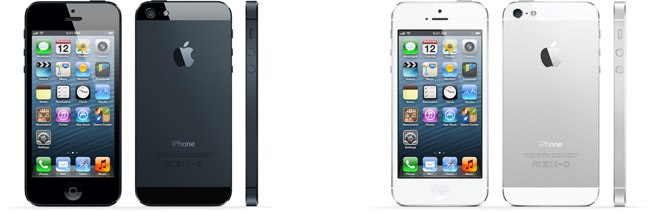
Color

Black & Slate White & Silver

Capacity1


  • 16GB
  • 32GB
  • 64GB
Size and Weight2

  • Height: 4.87 inches (123.8 mm)
  • Width: 2.31 inches (58.6 mm)
  • Depth: 0.30 inch (7.6 mm)
  • Weight: 3.95 ounces (112 grams)
Cellular and Wireless

  • GSM model A1428*: UMTS/HSPA+/DC-HSDPA (850, 900, 1700/2100, 1900, 2100 MHz); GSM/EDGE (850, 900, 1800, 1900 MHz); LTE (Bands 4 and 17)
  • CDMA model A1429*: CDMA EV-DO Rev. A and Rev. B (800, 1900, 2100 MHz); UMTS/HSPA+/DC-HSDPA (850, 900, 1900, 2100 MHz); GSM/EDGE (850, 900, 1800, 1900 MHz); LTE (Bands 1, 3, 5, 13, 25)
  • GSM model A1429*: UMTS/HSPA+/DC-HSDPA (850, 900, 1900, 2100 MHz); GSM/EDGE (850, 900, 1800, 1900 MHz); LTE (Bands 1, 3, 5)
  • 802.11a/b/g/n Wi-Fi (802.11n 2.4GHz and 5GHz)
  • Bluetooth 4.0 wireless technology
Location

  • Assisted GPS and GLONASS
  • Digital compass
  • Wi-Fi
  • Cellular
Display

  • Retina display
  • 4-inch (diagonal) widescreen Multi-Touch display
  • 1136-by-640-pixel resolution at 326 ppi
  • 800:1 contrast ratio (typical)
  • 500 cd/m2 max brightness (typical)
  • Fingerprint-resistant oleophobic coating on front
  • Support for display of multiple languages and characters simultaneously
Camera, Photos, and Video

  • 8-megapixel iSight camera
  • Panorama
  • Video recording, HD (1080p) up to 30 frames per second with audio
  • FaceTime HD camera with 1.2MP photos and HD video (720p) up to 30 frames per second
  • Autofocus
  • Tap to focus video or still images
  • Face detection in video or still images
  • LED flash
  • Improved video stabilization
  • Photo and video geotagging
External Buttons and Connectors

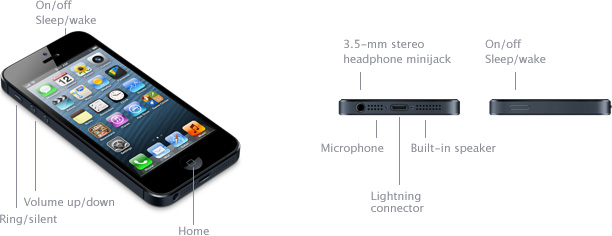
External Buttons and Controls Connectors and Input/Output
Power and Battery3

  • Built-in rechargeable lithium-ion battery
  • Charging via USB to computer system or power adapter
  • Talk time: Up to 8 hours on 3G
  • Standby time: Up to 225 hours
  • Internet use: Up to 8 hours on 3G, up to 8 hours on LTE, up to 10 hours on Wi-Fi
  • Video playback: Up to 10 hours
  • Audio playback: Up to 40 hours
Audio Playback

  • Audio formats supported: AAC (8 to 320 Kbps), Protected AAC (from iTunes Store), HE-AAC, MP3 (8 to 320 Kbps), MP3 VBR, Audible (formats 2, 3, 4, Audible Enhanced Audio, AAX, and AAX+), Apple Lossless, AIFF, and WAV
  • User-configurable maximum volume limit
TV and Video

  • AirPlay mirroring and video out to Apple TV (2nd and 3rd generation)
  • Video mirroring and video out support: Up to 1080p through Lightning Digital AV Adapter and Lightning to VGA Adapter (adapters sold separately)
  • Video formats supported: H.264 video up to 1080p, 30 frames per second, High Profile level 4.1 with AAC-LC audio up to 160 Kbps, 48kHz, stereo audio in .m4v, .mp4, and .mov file formats; MPEG-4 video up to 2.5 Mbps, 640 by 480 pixels, 30 frames per second, Simple Profile with AAC-LC audio up to 160 Kbps per channel, 48kHz, stereo audio in .m4v, .mp4, and .mov file formats; Motion JPEG (M-JPEG) up to 35 Mbps, 1280 by 720 pixels, 30 frames per second, audio in ulaw, PCM stereo audio in .avi file format
Headphones

  • Apple EarPods with Remote and Mic
  • Storage and travel case
Rating for Hearing Aids

  • iPhone 5 (Model A1428): M3, T4
  • iPhone 5 (Model A1429): M4, T4
Mail Attachment Support

  • Viewable Document Types
    .jpg, .tiff, .gif (images); .doc and .docx (Microsoft Word); .htm and .html (web pages); .key (Keynote); .numbers (Numbers); .pages (Pages); .pdf (Preview and Adobe Acrobat); .ppt and .pptx (Microsoft PowerPoint); .txt (text); .rtf (rich text format); .vcf (contact information); .xls and .xlsx (Microsoft Excel)
Sensors

  • Three-axis gyro
  • Accelerometer
  • Proximity sensor
  • Ambient light sensor
System Requirements

  • Apple ID (required for some features)
  • Internet access4
  • Syncing with iTunes on a Mac or PC requires:
    • Mac: OS X v10.6.8 or later
    • PC: Windows 7; Windows Vista; or Windows XP Home or Professional with Service Pack 3 or later
    • iTunes 10.7 or later (free download from www.itunes.com/download)
Environmental Requirements

  • Operating ambient temperature: 32° to 95° F (0° to 35° C)
  • Nonoperating temperature: −4° to 113° F (−20° to 45° C)
  • Relative humidity: 5% to 95% noncondensing
  • Maximum operating altitude: 10,000 feet (3000 m)
Languages


  • Language Support
    English (U.S.), English (UK), Chinese (Simplified), Chinese (Traditional), French, German, Italian, Japanese, Korean, Spanish, Arabic, Catalan, Croatian, Czech, Danish, Dutch, Finnish, Greek, Hebrew, Hungarian, Indonesian, Malay, Norwegian, Polish, Portuguese, Portuguese (Brazil), Romanian, Russian, Slovak, Swedish, Thai, Turkish, Ukrainian, Vietnamese
  • Keyboard Support
    English (U.S.), English (UK), Chinese - Simplified (Handwriting, Pinyin, Stroke), Chinese - Traditional (Handwriting, Pinyin, Zhuyin, Cangjie, Stroke), French, French (Canadian), French (Switzerland), German (Germany), German (Switzerland), Italian, Japanese (Romaji, Kana), Korean, Spanish, Arabic, Bulgarian, Catalan, Cherokee, Croatian, Czech, Danish, Dutch, Emoji, Estonian, Finnish, Flemish, Greek, Hawaiian, Hebrew, Hindi, Hungarian, Icelandic, Indonesian, Latvian, Lithuanian, Macedonian, Malay, Norwegian, Polish, Portuguese, Portuguese (Brazil), Romanian, Russian, Serbian (Cyrillic/Latin), Slovak, Swedish, Thai, Tibetan, Turkish, Ukrainian, Vietnamese
  • Dictionary Support (enables predictive text and autocorrect)
    English (U.S.), English (UK), Chinese (Simplified), Chinese (Traditional), French, French (Canadian), French (Switzerland), German, Italian, Japanese (Romaji, Kana), Korean, Spanish, Arabic, Catalan, Cherokee, Croatian, Czech, Danish, Dutch, Estonian, Finnish, Flemish, Greek, Hawaiian, Hebrew, Hindi, Hungarian, Indonesian, Latvian, Lithuanian, Malay, Norwegian, Polish, Portuguese, Portuguese (Brazil), Romanian, Russian, Slovak, Swedish, Thai, Turkish, Ukrainian, Vietnamese
  • Siri Languages
    English (U.S., UK, Canada, Australia), Spanish (U.S., Mexico, Spain), French (France, Canada, Switzerland), German (Germany, Switzerland), Italian (Italy, Switzerland), Japanese, Korean, Mandarin (Mainland China, Taiwan), Cantonese (Hong Kong)
In the Box

  • iPhone 5
  • Apple EarPods with Remote and Mic
  • Lightning to USB Cable
  • USB Power Adapter
  • Documentation
Accessories

Lightning to 30-pin Adapter
Connect your current accessories to iPhone 5 using this adapter. Buy now
Apple World Travel Adapter Kit
Plug your Apple power adapter into most electrical outlets around the world. Buy now
Other Accessories
See more accessories in the Apple Online Store
iPhone and the Environment

Apple takes a complete product life cycle approach to determining our environmental impact. Learn more
iPhone embodies Apple’s continuing environmental progress. It is designed with the following features to reduce environmental impact:
  • Mercury-free LED-backlit display
  • Arsenic-free display glass
  • Brominated flame retardant-free
  • PVC-free
  • Recyclable aluminum enclosure
  • Power adapter outperforms strictest global energy efficiency standards
Apple and the Environment
Learn more about Apple’s dedication to reducing the environmental impact of our products and process. Apple Product Environmental Reports detail the environmental attributes of our products.
Recycling
Apple takes a holistic view of materials management and waste minimization. Learn more about how to recycle your iPhone.
*To identify your iPhone 5 model number, see Identifying iPhone models. For details on LTE support, contact your carrier and see Apple - iPhone 5 - View countries with supported LTE networks..
  1. 1GB = 1 billion bytes; actual formatted capacity less.
  2. Actual size and weight vary by configuration and manufacturing process.
  3. All battery claims depend on network configuration and many other factors; actual results will vary. Battery has limited recharge cycles and may eventually need to be replaced by Apple service provider. Battery life and charge cycles vary by use and settings. See www.apple.com/batteries and www.apple.com/batteries/iphone.html for more information.
  4. Wireless broadband recommended; fees may apply.
Some features may not be available for all countries or all areas. Click here to see complete list.
Some features, applications, and services are not available in all areas. See your carrier for details. Application availability and pricing are subject to change.
Share:

iphone 5 power button way


iphone 5 power button solution


Share:

iPhone 5 - Technical Specifications

Color

Black & Slate White & Silver


Capacity1


  • 16GB
  • 32GB
  • 64GB
Size and Weight2

  • Height: 4.87 inches (123.8 mm)
  • Width: 2.31 inches (58.6 mm)
  • Depth: 0.30 inch (7.6 mm)
  • Weight: 3.95 ounces (112 grams)
Cellular and Wireless

  • GSM model A1428*: UMTS/HSPA+/DC-HSDPA (850, 900, 1700/2100, 1900, 2100 MHz); GSM/EDGE (850, 900, 1800, 1900 MHz); LTE (Bands 4 and 17)
  • CDMA model A1429*: CDMA EV-DO Rev. A and Rev. B (800, 1900, 2100 MHz); UMTS/HSPA+/DC-HSDPA (850, 900, 1900, 2100 MHz); GSM/EDGE (850, 900, 1800, 1900 MHz); LTE (Bands 1, 3, 5, 13, 25)
  • GSM model A1429*: UMTS/HSPA+/DC-HSDPA (850, 900, 1900, 2100 MHz); GSM/EDGE (850, 900, 1800, 1900 MHz); LTE (Bands 1, 3, 5)
  • 802.11a/b/g/n Wi-Fi (802.11n 2.4GHz and 5GHz)
  • Bluetooth 4.0 wireless technology
Location

  • Assisted GPS and GLONASS
  • Digital compass
  • Wi-Fi
  • Cellular
Display

  • Retina display
  • 4-inch (diagonal) widescreen Multi-Touch display
  • 1136-by-640-pixel resolution at 326 ppi
  • 800:1 contrast ratio (typical)
  • 500 cd/m2 max brightness (typical)
  • Fingerprint-resistant oleophobic coating on front
  • Support for display of multiple languages and characters simultaneously
Camera, Photos, and Video

  • 8-megapixel iSight camera
  • Panorama
  • Video recording, HD (1080p) up to 30 frames per second with audio
  • FaceTime HD camera with 1.2MP photos and HD video (720p) up to 30 frames per second
  • Autofocus
  • Tap to focus video or still images
  • Face detection in video or still images
  • LED flash
  • Improved video stabilization
  • Photo and video geotagging
External Buttons and Connectors

External Buttons and Controls Connectors and Input/Output

Power and Battery3

  • Built-in rechargeable lithium-ion battery
  • Charging via USB to computer system or power adapter
  • Talk time: Up to 8 hours on 3G
  • Standby time: Up to 225 hours
  • Internet use: Up to 8 hours on 3G, up to 8 hours on LTE, up to 10 hours on Wi-Fi
  • Video playback: Up to 10 hours
  • Audio playback: Up to 40 hours
Audio Playback

  • Audio formats supported: AAC (8 to 320 Kbps), Protected AAC (from iTunes Store), HE-AAC, MP3 (8 to 320 Kbps), MP3 VBR, Audible (formats 2, 3, 4, Audible Enhanced Audio, AAX, and AAX+), Apple Lossless, AIFF, and WAV
  • User-configurable maximum volume limit
TV and Video

  • AirPlay mirroring and video out to Apple TV (2nd and 3rd generation)
  • Video mirroring and video out support: Up to 1080p through Lightning Digital AV Adapter and Lightning to VGA Adapter (adapters sold separately)
  • Video formats supported: H.264 video up to 1080p, 30 frames per second, High Profile level 4.1 with AAC-LC audio up to 160 Kbps, 48kHz, stereo audio in .m4v, .mp4, and .mov file formats; MPEG-4 video up to 2.5 Mbps, 640 by 480 pixels, 30 frames per second, Simple Profile with AAC-LC audio up to 160 Kbps per channel, 48kHz, stereo audio in .m4v, .mp4, and .mov file formats; Motion JPEG (M-JPEG) up to 35 Mbps, 1280 by 720 pixels, 30 frames per second, audio in ulaw, PCM stereo audio in .avi file format
Headphones

  • Apple EarPods with Remote and Mic
  • Storage and travel case
Rating for Hearing Aids

  • iPhone 5 (Model A1428): M3, T4
  • iPhone 5 (Model A1429): M4, T4
Mail Attachment Support

  • Viewable Document Types
    .jpg, .tiff, .gif (images); .doc and .docx (Microsoft Word); .htm and .html (web pages); .key (Keynote); .numbers (Numbers); .pages (Pages); .pdf (Preview and Adobe Acrobat); .ppt and .pptx (Microsoft PowerPoint); .txt (text); .rtf (rich text format); .vcf (contact information); .xls and .xlsx (Microsoft Excel)
Sensors

  • Three-axis gyro
  • Accelerometer
  • Proximity sensor
  • Ambient light sensor
System Requirements

  • Apple ID (required for some features)
  • Internet access4
  • Syncing with iTunes on a Mac or PC requires:
    • Mac: OS X v10.6.8 or later
    • PC: Windows 7; Windows Vista; or Windows XP Home or Professional with Service Pack 3 or later
    • iTunes 10.7 or later (free download from www.itunes.com/download)
Environmental Requirements

  • Operating ambient temperature: 32° to 95° F (0° to 35° C)
  • Nonoperating temperature: −4° to 113° F (−20° to 45° C)
  • Relative humidity: 5% to 95% noncondensing
  • Maximum operating altitude: 10,000 feet (3000 m)
Languages


  • Language Support
    English (U.S.), English (UK), Chinese (Simplified), Chinese (Traditional), French, German, Italian, Japanese, Korean, Spanish, Arabic, Catalan, Croatian, Czech, Danish, Dutch, Finnish, Greek, Hebrew, Hungarian, Indonesian, Malay, Norwegian, Polish, Portuguese, Portuguese (Brazil), Romanian, Russian, Slovak, Swedish, Thai, Turkish, Ukrainian, Vietnamese
  • Keyboard Support
    English (U.S.), English (UK), Chinese - Simplified (Handwriting, Pinyin, Stroke), Chinese - Traditional (Handwriting, Pinyin, Zhuyin, Cangjie, Stroke), French, French (Canadian), French (Switzerland), German (Germany), German (Switzerland), Italian, Japanese (Romaji, Kana), Korean, Spanish, Arabic, Bulgarian, Catalan, Cherokee, Croatian, Czech, Danish, Dutch, Emoji, Estonian, Finnish, Flemish, Greek, Hawaiian, Hebrew, Hindi, Hungarian, Icelandic, Indonesian, Latvian, Lithuanian, Macedonian, Malay, Norwegian, Polish, Portuguese, Portuguese (Brazil), Romanian, Russian, Serbian (Cyrillic/Latin), Slovak, Swedish, Thai, Tibetan, Turkish, Ukrainian, Vietnamese
  • Dictionary Support (enables predictive text and autocorrect)
    English (U.S.), English (UK), Chinese (Simplified), Chinese (Traditional), French, French (Canadian), French (Switzerland), German, Italian, Japanese (Romaji, Kana), Korean, Spanish, Arabic, Catalan, Cherokee, Croatian, Czech, Danish, Dutch, Estonian, Finnish, Flemish, Greek, Hawaiian, Hebrew, Hindi, Hungarian, Indonesian, Latvian, Lithuanian, Malay, Norwegian, Polish, Portuguese, Portuguese (Brazil), Romanian, Russian, Slovak, Swedish, Thai, Turkish, Ukrainian, Vietnamese
  • Siri Languages
    English (U.S., UK, Canada, Australia), Spanish (U.S., Mexico, Spain), French (France, Canada, Switzerland), German (Germany, Switzerland), Italian (Italy, Switzerland), Japanese, Korean, Mandarin (Mainland China, Taiwan), Cantonese (Hong Kong)
In the Box

  • iPhone 5
  • Apple EarPods with Remote and Mic
  • Lightning to USB Cable
  • USB Power Adapter
  • Documentation
Accessories
Lightning to 30-pin Adapter
Connect your current accessories to iPhone 5 using this adapter. Buy now
Apple World Travel Adapter Kit
Plug your Apple power adapter into most electrical outlets around the world. Buy now
Other Accessories
See more accessories in the Apple Online Store
iPhone and the Environment

Apple takes a complete product life cycle approach to determining our environmental impact. Learn more
iPhone embodies Apple’s continuing environmental progress. It is designed with the following features to reduce environmental impact:
  • Mercury-free LED-backlit display
  • Arsenic-free display glass
  • Brominated flame retardant-free
  • PVC-free
  • Recyclable aluminum enclosure
  • Power adapter outperforms strictest global energy efficiency standards
Apple and the Environment
Learn more about Apple’s dedication to reducing the environmental impact of our products and process. Apple Product Environmental Reports detail the environmental attributes of our products.
Recycling
Apple takes a holistic view of materials management and waste minimization. Learn more about how to recycle your iPhone.
*To identify your iPhone 5 model number, see Identifying iPhone models. For details on LTE support, contact your carrier and see Apple - iPhone 5 - View countries with supported LTE networks..
  1. 1GB = 1 billion bytes; actual formatted capacity less.
  2. Actual size and weight vary by configuration and manufacturing process.
  3. All battery claims depend on network configuration and many other factors; actual results will vary. Battery has limited recharge cycles and may eventually need to be replaced by Apple service provider. Battery life and charge cycles vary by use and settings. See www.apple.com/batteries and www.apple.com/batteries/iphone.html for more information.
  4. Wireless broadband recommended; fees may apply.
Some features may not be available for all countries or all areas. Click here to see complete list.
Some features, applications, and services are not available in all areas. See your carrier for details. Application availability and pricing are subject to change.
Share:

How to Jailbreak Your iPhone 5, 4S, 4, 3GS Using Evasi0n

How to Jailbreak Your iPhone 5, 4S, 4, 3GS Using Evasi0n (Windows) [6.1]


How to Jailbreak Your iPhone 5, 4S, 4, 3GS Using Evasi0n (Windows) [6.1]


These are instructions on how to jailbreak your iPhone 5, iPhone 4S, iPhone 4, or iPhone 3GS on iOS 6.0 to iOS 6.1 using Evasi0n for Windows.

Step One
Ensure your iPhone is on iOS 6.0 to iOS 6.1 then perform a backup of your iPhone using these instructions. If you are not on iOS 6.0 - iOS 6.1 you can find firmware download links

Step Two
Create a folder called Pwnage on your desktop and download the Evasi0n utility into the folder. You can find download links for Evasi0n


Step Three
Extract the Evasi0n zip file to the Pwnage folder on your desktop.


Step Four
Double click the newly created evasi0n-win folder to open it.


Step Five
Right click the Evasi0n exe icon then select Run as Administrator from the contextual menu to launch the application.


Step SixEnsure your iPhone is connected to the computer via a USB cable if you haven't already.


Step Seven
Remove any lock screen passcodes on your device then click the Jailbreak button to begin.


Step Eight
The app will retrieve information from the device to generate jailbreak data, inject stage 1 jailbreak data, reboot the device, wait for the device to be ready, inject stage 2 jailbreak data, upload Cydia, and upload the Cydia packages list.


Step Nine
You will then be asked to unlock your device and tap the new 'Jailbreak' app icon. It is imperative that you only tap the icon once. The app will open and immediately close.


Step Ten
Evasi0n will then inject the remount payload, remount the root filesystem, prepare the final jailbreak data, inject the final jailbreak data, and complete!


Step Eleven
Your iPhone will now reboot with Cydia on the SpringBoard!

Share:

Download "IOS 6.1 BETA iPhone5,2 A1429" [Fast Download]

Download "IOS 6.1 BETA iPhone5,2 A1429" [Fast Download]

Download "IOS 6.1 BETA iPhone5,2 A1429" [Fast Download]
IOS 6.1 BETA iPhone5,2 A1429

IOS 6.1 BETA iPhone5,2 A1429 | 991 MB

Ripped straight from DMG. Enjoy !!!

IOS 6.1 BETA iPhone5,2 A1429

(All below links are interchangable. No password)

Buy a Premium Account Rapidgator, Extabit & Lumfile = High speed + Parallel Downloads!

From Extabit (Premium Recommend)

http://extabit.com/file/279lkf0v0hcy6/a1429 iPhone5,2_6.1_10B5095f_Restore.part01.rar
http://extabit.com/file/279lkf0v0h6ni/a1429 iPhone5,2_6.1_10B5095f_Restore.part02.rar
http://extabit.com/file/279lkf0v0h09a/a1429 iPhone5,2_6.1_10B5095f_Restore.part03.rar
http://extabit.com/file/279lkf0v0gqq6/a1429 iPhone5,2_6.1_10B5095f_Restore.part04.rar
http://extabit.com/file/279lkf0v0gqtq/a1429 iPhone5,2_6.1_10B5095f_Restore.part05.rar
http://extabit.com/file/279lkf0v0h0a6/a1429 iPhone5,2_6.1_10B5095f_Restore.part06.rar
http://extabit.com/file/279lkf0v0gtzy/a1429 iPhone5,2_6.1_10B5095f_Restore.part07.rar
http://extabit.com/file/279lkf0uzu3ce/a1429 iPhone5,2_6.1_10B5095f_Restore.part08.rar
http://extabit.com/file/279lkf0uzu3bi/a1429 iPhone5,2_6.1_10B5095f_Restore.part09.rar
http://extabit.com/file/279lkf0v0gtwu/a1429 iPhone5,2_6.1_10B5095f_Restore.part10.rar

From Lumfile (Premium Recommend)

http://lumfile.com/b8kamjhtdmep/a1429_iPhone5,2_6.1_10B5095f_Restore.part01.rar.html
http://lumfile.com/5db1xa1g7yrq/a1429_iPhone5,2_6.1_10B5095f_Restore.part02.rar.html
http://lumfile.com/iwm1die38u6a/a1429_iPhone5,2_6.1_10B5095f_Restore.part03.rar.html
http://lumfile.com/dw55gpbue6a8/a1429_iPhone5,2_6.1_10B5095f_Restore.part04.rar.html
http://lumfile.com/08nuzjiyz769/a1429_iPhone5,2_6.1_10B5095f_Restore.part05.rar.html
http://lumfile.com/y138ahqy99k6/a1429_iPhone5,2_6.1_10B5095f_Restore.part06.rar.html
http://lumfile.com/fpwfuglefzys/a1429_iPhone5,2_6.1_10B5095f_Restore.part07.rar.html
http://lumfile.com/zx32f6ef6l8y/a1429_iPhone5,2_6.1_10B5095f_Restore.part08.rar.html
http://lumfile.com/a47gxf5cprue/a1429_iPhone5,2_6.1_10B5095f_Restore.part09.rar.html
http://lumfile.com/abovlwg9v4a8/a1429_iPhone5,2_6.1_10B5095f_Restore.part10.rar.html

From Uploaded (Premium Recommend)

http://uploaded.net/file/g2tdtweg/a1429%20iPhone5%2C2_6.1_10B5095f_Restore.part01.rar
http://uploaded.net/file/7h8cpg0p/a1429%20iPhone5%2C2_6.1_10B5095f_Restore.part02.rar
http://uploaded.net/file/ngljyqlf/a1429%20iPhone5%2C2_6.1_10B5095f_Restore.part03.rar
http://uploaded.net/file/rjlpqprg/a1429%20iPhone5%2C2_6.1_10B5095f_Restore.part04.rar
http://uploaded.net/file/qbzmjgyo/a1429%20iPhone5%2C2_6.1_10B5095f_Restore.part05.rar
http://uploaded.net/file/n546lqt3/a1429%20iPhone5%2C2_6.1_10B5095f_Restore.part06.rar
http://uploaded.net/file/7g1ijfam/a1429%20iPhone5%2C2_6.1_10B5095f_Restore.part07.rar
http://uploaded.net/file/00uf0bx3/a1429%20iPhone5%2C2_6.1_10B5095f_Restore.part08.rar
http://uploaded.net/file/yb8vr7cx/a1429%20iPhone5%2C2_6.1_10B5095f_Restore.part09.rar
http://uploaded.net/file/4zkoe3ad/a1429%20iPhone5%2C2_6.1_10B5095f_Restore.part10.rar
Share:

How to Jailbreak iPhone 5 & iOS 6.1 Devices with Evasi0n

Guide, How to Jailbreak iPhone 5 & iOS 6.1 Devices with Evasi0n


1 /Download the Evasi0n jailbreak
click link
2/ open and click jailbreak
Launch Evasi0n and connect the device to the computer via USB

After Evasi0n recognizes the device, click “Jailbreak” and let Evasi0n do it’s thing


3/ tap the “Evasion” icon on your iOS device at one point to complete the jailbreak


4 / dont touch ur divice

https://fbcdn-sphotos-b-a.akamaihd.n...12089815_n.jpg
5/ enjoy Untethered Jailbreak ur i divice and give thanks Evasi0n teams
successful Jailbreak by gopalhot pc

Share:

how to open Iphone 5

KM420


Share: